

Here is a guide on how to rebind your keys in under 5 mins.
intro
you may’ve loaded the game up and realized the default keybinds aren’t up to modern standards, and worse, there’s no in-game option to rebind them
with this quick and painless mod you’ll be able to have a far more convenient set of keybinds while still having the ability to input text properly at the press of a single button.
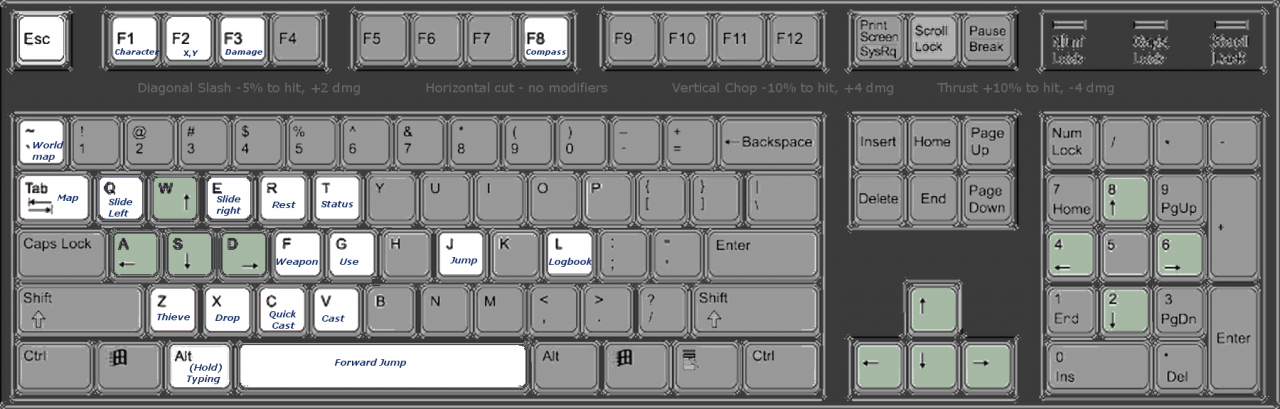
EZ walkthrough
- download the mod TES Arena Remapped[www.nexusmods.com]
- extract the contents of TES Arena REmapped-1-1-5
- find your local arena install folder and navigate to the dosbox folder
- copy and paste ‘mapper’ and ‘mapper-0.74.map’ into said dosbox folder
- voila
just remember: hold L ALT to seamlessly swap to text input when necessary
example folder location

how it oughta look when you’re done
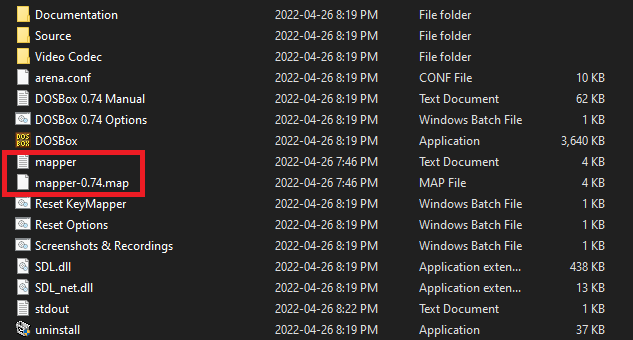
if all went well you should now have a much easier time enjoying the game
credit to ArtInPinkerton (aka Pinkertonius)[www.nexusmods.com] for TES:Arena Remapped
Thanks to brain injury style for his great guide, all credit to his effort. you can also read the original guide from Steam Community. enjoy the game.
