
This simple guide will show you how to make the nights brighter.
How to Increase Gamma/Brightness
1) Close the game
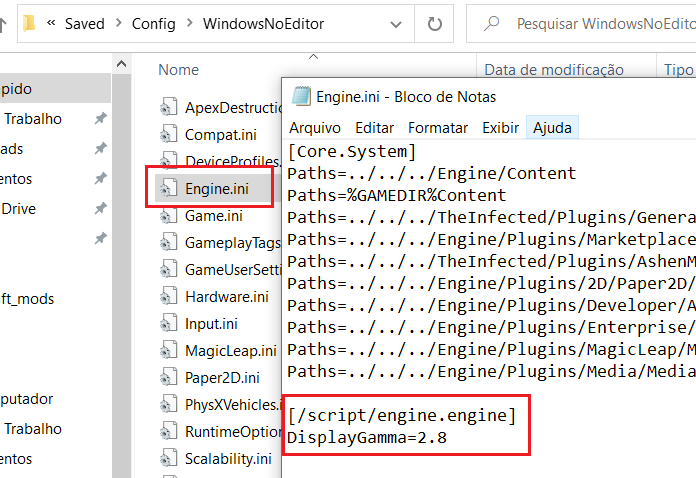
2) Open StartMenu… Run… and type:
%appdata%\..\Local\TheInfected\Saved\Config\WindowsNoEditor
Note: The directory may be different for you – in that case, use the search tool
3) Open the Engine.ini file and type:
[/script/engine.engine]
DisplayGamma=2.8
4) Save the Engine.ini file
5) Start the game
You’re welcome!
—
Thanks to .dot. for his great guide, all credit to his effort. you can also read the original guide from Steam Community. enjoy the game.

Thank you so much, the game was just a little too dark at night to get a nice feeling, this helped a lot thanks! I made mine closer to 2.5 since 2.8 was a little too bright at night but thank you!