

This shows you how to add keybinds and map 2 keys to 1 action
Input Bindings
–Location–
Navigate to : %localappdata% – Tiger – Settings – Open InputBindings in Notepad
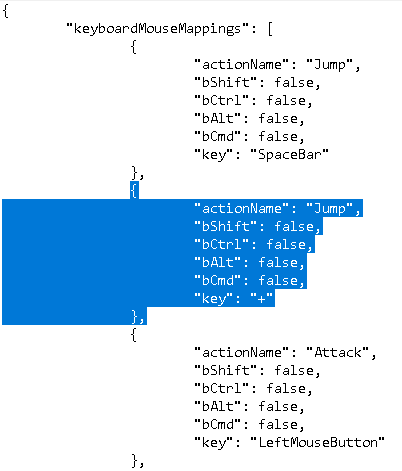
Above the marked area you’ll see the default “Jump”.
Copy and paste and remember to line up the code!
Copy and paste and remember to line up the code!
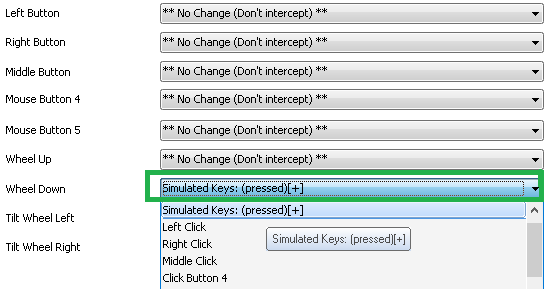
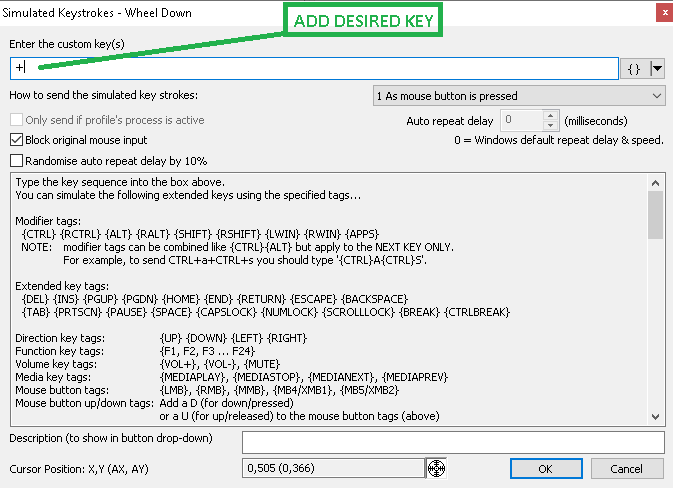
If you are like me and want Jump on ScrollWheelDown you can use a nifty little software called X-mouse Button Control and remap “ScrollWheelDown” to f.ex “+” or any desired key.
IMPORTANT! – Make the file “Read Only” before launching the game.
Thanks to Gunther Wolfgang for his great guide, all credit to his effort. you can also read the original guide from Steam Community. enjoy the game.
